A technical exploration of columnar storage, analytical processing, and the architecture that makes ClickHouse® one of the fastest analytical databases available today.
Introduction
Modern applications generate massive amounts of data from logs and user events to metrics and transaction records. Storing this data is easy. Querying it efficiently at scale is the real challenge. The ClickHouse® column-oriented database has become a popular choice for organizations that need fast and efficient analytical processing.
Traditional databases like PostgreSQL and MySQL are designed for transactional workloads. They perform exceptionally well for inserts, updates, and point lookups. However, analytical queries that scan millions or billions of rows often become expensive because of how data is stored.
This is where column-oriented databases shine. By storing data column by column instead of row by row, they significantly reduce disk I/O and accelerate analytical queries. As a result, organizations can analyze large datasets more efficiently.
Among modern analytical databases, ClickHouse® stands out for its speed, scalability, and efficient architecture. In this guide, we’ll explore how columnar storage works, why it is faster for analytics, and how ClickHouse leverages these principles to deliver exceptional performance.
What is a Column-Oriented Database?
A column-oriented database stores each column of a table independently, rather than storing complete rows together.
Consider this employee table:
| ID | Name | Department | Salary |
|---|---|---|---|
| 1 | Ram | IT | 50000 |
| 2 | Priya | HR | 45000 |
| 3 | Arjun | IT | 55000 |
Row-oriented storage writes data like this:
1, Ram,   IT, 50000
2, Priya, HR, 45000
3, Arjun, IT, 55000
Column-oriented storage writes data like this:
ID:         1, 2, 3
Name:       Ram, Priya, Arjun
Department: IT, HR, IT
Salary:     50000, 45000, 55000
The database stores each column separately. For example, when a query requires only the Salary column, the database reads only that data and ignores everything else.
Row-Oriented vs Column-Oriented Databases
| Property | Row-Oriented (MySQL, PostgreSQL) | Column-Oriented (ClickHouse) |
|---|---|---|
| Storage layout | Full rows stored together | Each column stored separately |
| Best for | Inserts, updates, point reads | Aggregations, scans, analytics |
| Column scan | Reads all columns even if unused | Reads only queried columns |
| Compression | Low (mixed types per block) | High (similar values grouped) |
| Aggregation speed | Slower | Much faster |
| Row retrieval | Fast | Less optimized |
Row-oriented databases store all fields of a row together. Even if a query requires only a few columns, the database often reads much more data than necessary.
Column-oriented databases eliminate this overhead by accessing only the columns involved in the query.
Why Column-Oriented Databases Are Faster
The performance advantage of column-oriented databases comes from how they store and access data. Instead of reading entire rows, they focus only on the columns required by a query.
Reading Only the Required Columns
Consider the following query:
SELECT AVG(salary) FROM employees;Only the salary column is required.
A row-oriented database may need to read every column in the table, while a column-oriented database reads only the salary data, reducing disk I/O and improving query performance
Higher Compression Efficiency
Column-oriented storage keeps similar data types together. Since values within a column often share common patterns, compression algorithms can achieve much higher compression ratios than in row-based storage.
For example:
ITITITHRHRRepeated values compress far more efficiently than mixed row data. Consequently, less storage space is required.
Benefits include:
- Reduced storage requirements
- Faster disk reads
- Lower memory consumption
- Improved query performance
Faster Aggregations
Analytical workloads frequently involve aggregations such as:
SELECT department, SUM(salary) FROM employees GROUP BY department;This query requires only the department and salary columns.
A column-oriented database reads and processes only these columns, avoiding unnecessary data access. As a result, aggregation operations such as SUM, AVG, COUNT, and **GROUP BY** can be executed much more efficiently, especially when working with millions or billions of rows.
Key Takeaway
Column-oriented databases achieve better analytical performance by reading less data, compressing it more efficiently, and processing only the columns required by a query.
Introducing ClickHouse®
ClickHouse® is an open-source, column-oriented database management system designed for Online Analytical Processing (OLAP).
Originally developed to handle large-scale analytical workloads, ClickHouse® is now widely used for:
- Real-time analytics
- Log analysis
- Monitoring systems
- Business intelligence reporting
- Event tracking
- Time-series analytics
Its architecture combines columnar storage, advanced compression, sparse indexing, and parallel query execution to deliver exceptional analytical performance. Furthermore, these features work together to improve query speed and scalability.
Understanding the MergeTree Engine
The MergeTree engine is the foundation of most ClickHouse® deployments.
When data is inserted:
- ClickHouse creates a new data part.
- ClickHouse sorts data according to the ORDER BY key.
- ClickHouse stores and compresses columns independently.
- Background merge operations combine smaller parts into larger ones.
CREATE TABLE logs( timestamp DateTime, service String, status UInt16)ENGINE = MergeTreeORDER BY (service, timestamp);This architecture enables efficient data skipping, high compression ratios, and fast analytical queries.In addition, it helps ClickHouse handle large-scale analytical workloads efficiently.
How ClickHouse® Processes a Query
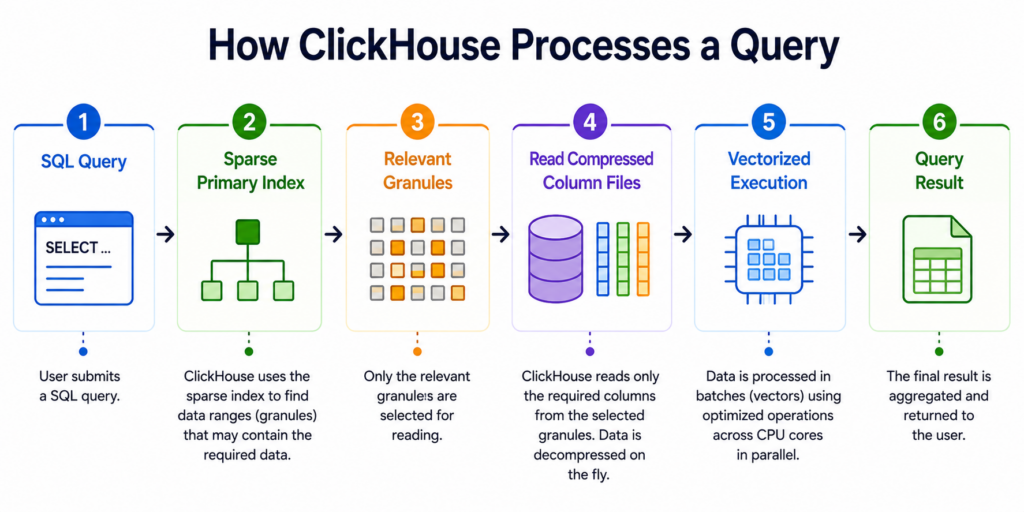
Key Advantages of ClickHouse®
1. Exceptional Query Performance
ClickHouse® is designed to execute analytical queries on massive datasets with extremely low latency. By combining columnar storage, vectorized execution, and parallel processing, it can scan and aggregate millions or even billions of rows in seconds.
Unlike traditional row-oriented databases, ClickHouse reads only the columns required by a query, significantly reducing disk I/O and CPU overhead.
Example
Consider a table containing billions of log records:
SELECT AVG(response_time) FROM logs WHERE event_date = '2026-06-01';To calculate the average response time, ClickHouse reads only the response_time and event_date columns instead of scanning every column in the table, resulting in much faster query execution.
2. High Compression Efficiency
ClickHouse® achieves excellent compression ratios because data is stored column by column. Similar values are grouped together, making them easier to compress.
In addition to standard compression algorithms such as LZ4 and ZSTD, ClickHouse supports specialized codecs like Delta and DoubleDelta that further reduce storage requirements.
Example
A timestamp column containing:
2026-06-01 10:00:00
2026-06-01 10:00:01
2026-06-01 10:00:02
2026-06-01 10:00:03
can be stored efficiently using:
timestamp DateTime CODEC(DoubleDelta, LZ4)The DoubleDelta codec stores only the differences between values before compression, significantly reducing storage size.
3. Sparse Primary Index and Data Skipping
Traditional databases often maintain index entries for every row. ClickHouse uses a sparse index that stores information for groups of rows called granules.
This approach keeps indexes small enough to fit in memory while still allowing ClickHouse to quickly identify relevant data during query execution.
Example
SELECT * FROM logs WHERE event_date = '2026-06-01';Instead of scanning the entire table, ClickHouse uses the sparse index to locate only the granules that may contain records for the specified date and skips the rest.
4. Parallel Query Execution
ClickHouse® automatically distributes query execution across all available CPU cores. When deployed in a cluster, queries can also be executed across multiple nodes simultaneously.
This allows the database to fully utilize available hardware resources.
Example
If a server has 16 CPU cores, ClickHouse can process different portions of a query in parallel rather than using a single thread, reducing overall execution time.
5. Real-Time Data Ingestion
Unlike traditional data warehouses that depend on scheduled ETL jobs, ClickHouse allows newly inserted data to become available for querying almost immediately.
Therefore, it is well suited for applications that require near real-time insights.
Example
INSERT INTO logs VALUES (now(),'payment-service',200,120);The inserted record can typically be queried within seconds, making ClickHouse ideal for monitoring and observability workloads.
6. Horizontal Scalability
As data volumes grow, ClickHouse® can distribute data across multiple nodes using sharding. Queries are executed on all shards in parallel and the results are combined automatically.
As a result, organizations can scale storage and compute capacity without redesigning their applications.
Example
A company storing 50 TB of analytics data can distribute that data across multiple ClickHouse® nodes and continue running queries efficiently as the dataset grows.
7. SQL Compatibility
ClickHouse® supports standard SQL syntax, making it easy for developers, analysts, and data engineers to get started without learning a new query language.
Example
SELECT department,COUNT(*) AS employees
FROM employee_data GROUP BY department ORDER BY employees DESC;
Therefore, users familiar with MySQL, PostgreSQL, or SQL Server can quickly begin working with ClickHouse® using familiar SQL concepts.
Common Use Cases of ClickHouse®
Real-Time Analytics
- Powering dashboards, user activity tracking, and operational reporting with low-latency queries.
Log Analytics
- Analyzing and troubleshooting large volumes of application and system logs efficiently.
Monitoring and Observability
- Processing metrics, logs, and traces to monitor system health and investigate issues.
Business Intelligence
- Generating reports and dashboards for sales, customer behavior, and operational analytics.
Time-Series Analytics
- Handling IoT data, application metrics, and financial events with fast query performance.
A Note on Use Cases
ClickHouse® is designed for analytical workloads such as reporting, monitoring, and real-time analytics. For applications that require frequent updates, complex transactions, or traditional OLTP operations, databases such as PostgreSQL or MySQL are often a better fit.
Exploring ClickHouse® for Your Analytics?
At Quantrail Data, we help teams run ClickHouse® reliably for real-time analytics – from Kubernetes deployments and migrations to performance tuning in production.
We see these challenges firsthand while supporting demanding analytics workloads. In one recent engagement, a customer achieved near bare-metal performance with ClickHouse® in production – a story we’ve shared here:
Success Story: Quantrail Bare-Metal ClickHouse® Deployment
If you’re evaluating ClickHouse® or trying to get more out of an existing setup, we’re happy to share practical lessons from real-world deployments.
Contact
Quantrail Data
Conclusion
Column-oriented databases are purpose-built for analytical workloads, enabling faster queries, better compression, and more efficient use of hardware resources.
ClickHouse® extends these advantages through its MergeTree storage engine, sparse indexing, advanced compression techniques, and vectorized query execution. Together, these features allow it to process massive datasets with remarkable speed and efficiency.
Whether you are building analytics dashboards, observability platforms, log analytics solutions, or time-series applications, ClickHouse® provides a powerful foundation for real-time data analysis at scale. As data volumes continue to grow, understanding how ClickHouse works offers valuable insight into the technologies that power modern analytics platforms.
References
- ClickHouse® Architecture Overview: https://clickhouse.com/docs/concepts/why-clickhouse-is-so-fast
- ClickHouse® Data Parts and Storage Architecture: https://clickhouse.com/docs/parts