1. Introduction
As organizations generate massive amounts of data every day, the demand for fast and efficient analytics continues to grow. ClickHouse® is a high-performance, column-oriented database management system designed specifically for Online Analytical Processing (OLAP) workloads. It enables organizations to analyze billions of rows of data in seconds while maintaining excellent query performance.
One of the key reasons behind ClickHouse’s speed and scalability is its storage engine architecture. In particular, the MergeTree family powers most analytical workloads in ClickHouse. A storage engine determines how data is stored, indexed, compressed, and retrieved. Among the available storage engines, the MergeTree family is the most widely used because it provides the foundation for high-performance analytical workloads.
In this article, we’ll explore what MergeTree engines are, how they work internally, their key components, and the different variants available within the MergeTree family.
2. What is MergeTree?
MergeTree is the primary storage engine in ClickHouse® and serves as the foundation for several specialized engines. It is designed to efficiently store and process large volumes of analytical data while delivering fast query performance.
Most ClickHouse® tables use MergeTree because it offers:
- High-speed data ingestion
- Efficient compression
- Fast analytical queries
- Automatic background optimization
- Scalability for large datasets
A simple MergeTree table can be created as follows:
CREATE TABLE events
(
    event_time DateTime,
    user_id UInt64,
    event_type String
)
ENGINE = MergeTree
ORDER BY (event_time, user_id);
In this example, data is physically sorted by event_time and user_id, enabling ClickHouse® to quickly locate relevant records during query execution.
Core Characteristics
- Column-oriented storage
- Sorted data organization
- Sparse primary indexing
- Background merge operations
- High compression efficiency
- Excellent scalability
These characteristics make MergeTree ideal for analytical workloads involving large datasets.
3. How MergeTree Works Internally
Understanding how MergeTree manages data internally helps explain why ClickHouse® can process analytical queries so efficiently.
Data Parts
When data is inserted into a MergeTree table, ClickHouse® does not modify existing data files. Instead, each insert operation creates a new immutable data part.
For example:
INSERT INTO events VALUES
('2025-01-01 10:00:00', 101, 'login');
Each batch of inserted records becomes a separate data part stored on disk.
Sorting Data with ORDER BY
Before data is written to disk, it is sorted according to the ORDER BY key defined in the table schema.
ORDER BY (event_time, user_id)Sorting helps ClickHouse® efficiently locate data during query execution and reduces the amount of data that must be scanned.
Sparse Primary Index
Unlike traditional databases that store index entries for every row, ClickHouse® uses a sparse primary index.
The sparse index stores references to groups of rows, allowing ClickHouse® to quickly identify which data blocks may contain the requested information while minimizing storage overhead.
Background Merges
As new data is continuously inserted, many small data parts accumulate over time.
To maintain performance, ClickHouse® automatically performs background merges that:
- Combine smaller parts into larger ones
- Improve compression efficiency
- Reduce storage fragmentation
- Minimize the number of files scanned during queries
This continuous merge process is the reason the engine is called MergeTree.
MergeTree Workflow
When data is inserted into a MergeTree table, ClickHouse® automatically organizes and optimizes it for fast querying.
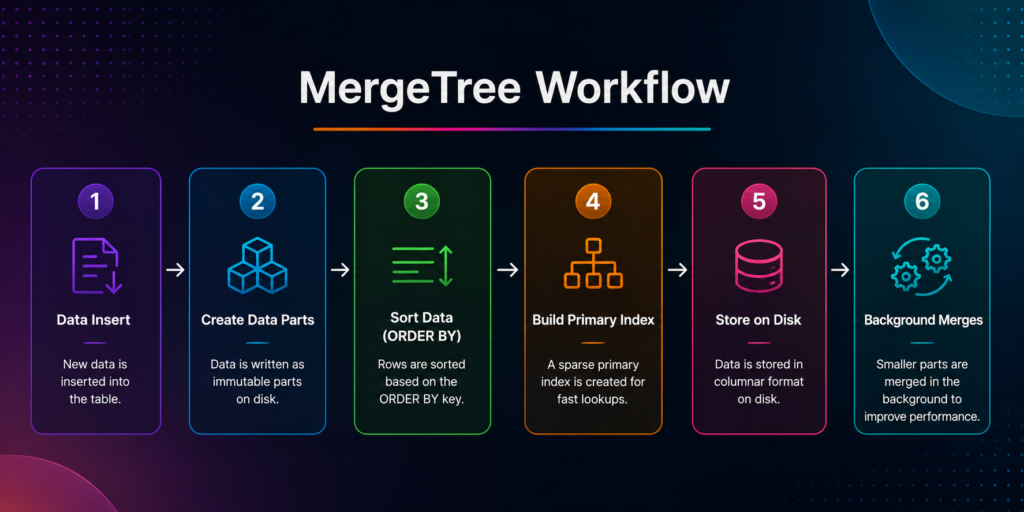
First, ClickHouse writes new records to the table. Next, it stores the data as separate parts on disk. Then, it sorts the rows using the **ORDER BY** key and builds a primary index. Finally, ClickHouse performs background merges to optimize storage and query performance.
This workflow helps MergeTree maintain efficient storage and deliver fast analytical queries.
4. How MergeTree Accelerates Query Execution
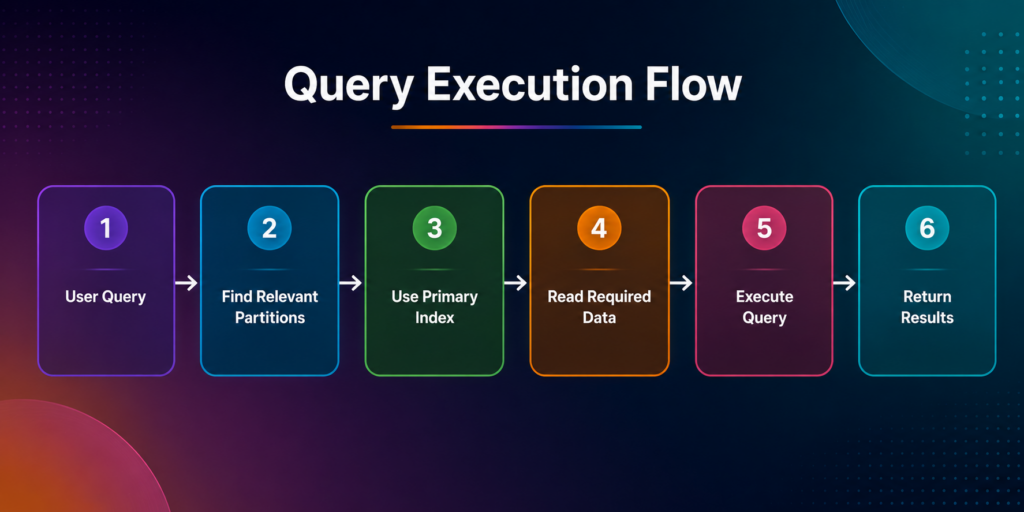
One of the biggest advantages of MergeTree is its ability to reduce the amount of data that ClickHouse needs to read during query execution. Instead of scanning an entire table, MergeTree uses partitions, sorting keys, and indexes to quickly locate the relevant data.
Think of a large library containing millions of books. If you want a book published in 2025, a librarian doesn’t search every book in the building. Instead, they first go to the 2025 section, then locate the correct shelf, and finally retrieve the required book. MergeTree follows a similar approach when processing queries.
What Happens Behind the Scenes?
- Partition Pruning – ClickHouse® identifies the partitions that may contain the requested data and skips the rest.
- Index Lookup – The sparse primary index helps locate the relevant data ranges without scanning every row.
- Column Selection – Since ClickHouse is column-oriented, only the required columns are read from disk.
- Query Processing – Filters, aggregations, and calculations are performed on the selected data.
- Result Generation – The final result is returned to the user.
As a result, MergeTree reads only the necessary data, reduces disk I/O, and improves query performance. This optimization allows ClickHouse to analyze millions or even billions of rows efficiently, making it well-suited for large-scale analytical workloads.
5. Core Components of MergeTree
ORDER BY
The ORDER BY clause defines how data is stored on disk. Choosing the right sorting key helps ClickHouse locate data faster during queries.
ORDER BY (event_time, user_id)If a query filters by event_date, ClickHouse® can quickly find the matching data instead of scanning the entire table.
PRIMARY KEY
Theprimary key helps ClickHouse® identify where relevant data is located. MergeTree uses a sparse index, making lookups efficient without indexing every row.
PRIMARY KEY (event_time, user_id)A query searching for a specific date range can use the primary index to skip unnecessary data blocks.
PARTITION BY
Partitioning organizes data into separate sections, making large tables easier to manage and query.
PARTITION BY toYYYYMM(event_time)This creates monthly partitions such as:
202501202502202503For example, a query for June 2025 only needs to scan the June partition instead of the entire table.
SAMPLE BY
Sampling allows ClickHouse to read a subset of data for faster approximate analysis.
SAMPLE BY user_idInstead of reading billions of rows, ClickHouse® can analyze a representative sample and return results much faster.
6. MergeTree Family Engines
The MergeTree family includes multiple specialized engines designed for different analytical requirements.
| Engine | Primary Use Case |
|---|---|
| MergeTree | General-purpose analytics |
| ReplacingMergeTree | Deduplication and upserts |
| SummingMergeTree | Automatic aggregation |
| AggregatingMergeTree | Aggregate state storage |
| CollapsingMergeTree | Change tracking |
| VersionedCollapsingMergeTree | Version-based updates |
| ReplicatedMergeTree | High availability and replication |
MergeTree
MergeTree is the standard and most commonly used engine in ClickHouse®. It provides sorting, indexing, partitioning, and background merging, making it suitable for most analytical workloads.
Use Case: Log analytics, event tracking, and reporting systems.
Example:
ENGINE = MergeTree()ORDER BY event_timeReplacingMergeTree
**ReplacingMergeTree** helps handle duplicate records by keeping the latest version of a row during merge operations.
Use Case: User profiles, product catalogs, and datasets that receive updates.
Example:
ENGINE = ReplacingMergeTree(version)ORDER BY user_idIf multiple rows have the same user_id, the row with the latest version can replace older records during merges.
SummingMergeTree
SummingMergeTree automatically sums numeric columns that share the same sorting key.
Use Case: Sales reports, website metrics, and financial summaries.
Example:
ENGINE = SummingMergeTree()ORDER BY product_idInstead of storing multiple sales records separately, ClickHouse can combine them during merges.
AggregatingMergeTree
**AggregatingMergeTree** stores aggregate states rather than raw data, reducing query processing time.
Use Case: Materialized views and pre-aggregated dashboards.
Example:
ENGINE = AggregatingMergeTree()ORDER BY customer_idThis engine is useful when queries repeatedly calculate the same aggregations.
CollapsingMergeTree
CollapsingMergeTree uses a special sign column to remove or cancel out rows during merge operations.
Use Case: Event sourcing and change-tracking systems.
Example:
ENGINE = CollapsingMergeTree(sign)ORDER BY idRows with opposite sign values can be collapsed, reducing redundant data.
VersionedCollapsingMergeTree
**VersionedCollapsingMergeTree** extends CollapsingMergeTree by introducing version control.
Use Case: Historical records and systems with frequent updates.
Example:
ENGINE = VersionedCollapsingMergeTree(sign, version)ORDER BY idThe version column helps ClickHouse determine which record should be considered the latest.
ReplicatedMergeTree
**ReplicatedMergeTree** provides data replication across multiple ClickHouse® nodes, improving reliability and availability.
Use Case: Production environments and distributed clusters.
Example:
ENGINE = ReplicatedMergeTree(...)ORDER BY event_timeHowever, if one server becomes unavailable, replicated copies can continue serving queries.
Choosing the Right Engine
| Requirement | Recommended Engine |
|---|---|
| General analytics | MergeTree |
| Remove duplicates | ReplacingMergeTree |
| Automatic summation | SummingMergeTree |
| Pre-aggregated analytics | AggregatingMergeTree |
| Change tracking | CollapsingMergeTree |
| Version-based updates | VersionedCollapsingMergeTree |
| High availability | ReplicatedMergeTree |
7. Benefits of MergeTree Engines
- Fast Inserts
Efficiently handles large volumes of incoming data with minimal overhead.
- High Query Performance
Uses sorting, partitioning, and indexing to reduce the amount of data scanned.
- Efficient Storage
Stores data in a column-oriented format for optimized storage and retrieval.
- Data Compression
Achieves high compression ratios, reducing disk space requirements.
- Scalability
Supports analytical workloads ranging from millions to billions of rows.
8. Real-World Use Cases
- Log Analytics – Store and analyze application, server, and audit logs.
- Time-Series Data – Monitor metrics from systems, sensors, and IoT devices.
- Event Tracking – Track user activities such as clicks, page views, and transactions.
- Observability Platforms – Power monitoring solutions that process logs, metrics, and traces.
- BI Dashboards – Support reporting and business intelligence applications with fast analytical queries.
9. Best Practices
Choose an Appropriate ORDER BY Key
- Select columns that are frequently used in filtering and sorting operations.
Partition Wisely
- Use partitioning to improve query performance and simplify data management.
Avoid Over-Partitioning
- Creating too many partitions can increase overhead and impact performance.
Read Only Required Columns
- Query only the columns you need to reduce disk I/O and improve execution speed.
Exploring ClickHouse® for Your Analytics?
At Quantrail Data, we help teams run ClickHouse® reliably for real-time analytics – from Kubernetes deployments and migrations to performance tuning in production.
We see these challenges firsthand while supporting demanding analytics workloads. In one recent engagement, a customer achieved near bare-metal performance with ClickHouse® in production – a story we’ve shared here:
Success Story: Quantrail Bare-Metal ClickHouse® Deployment
If you’re evaluating ClickHouse® or trying to get more out of an existing setup, we’re happy to share practical lessons from real-world deployments.
Contact
Quantrail Data
Conclusion
MergeTree is the foundation of ClickHouse® storage and the engine behind most analytical workloads. Its combination of sorting, indexing, partitioning, compression, and background merges enables fast query execution on massive datasets.
Whether you’re building a log analytics platform, a monitoring system, or a business intelligence solution, understanding MergeTree is the first step toward mastering ClickHouse®. As your requirements evolve, you can explore specialized engines such as ReplacingMergeTree, SummingMergeTree, and ReplicatedMergeTree to address specific use cases.