Introduction
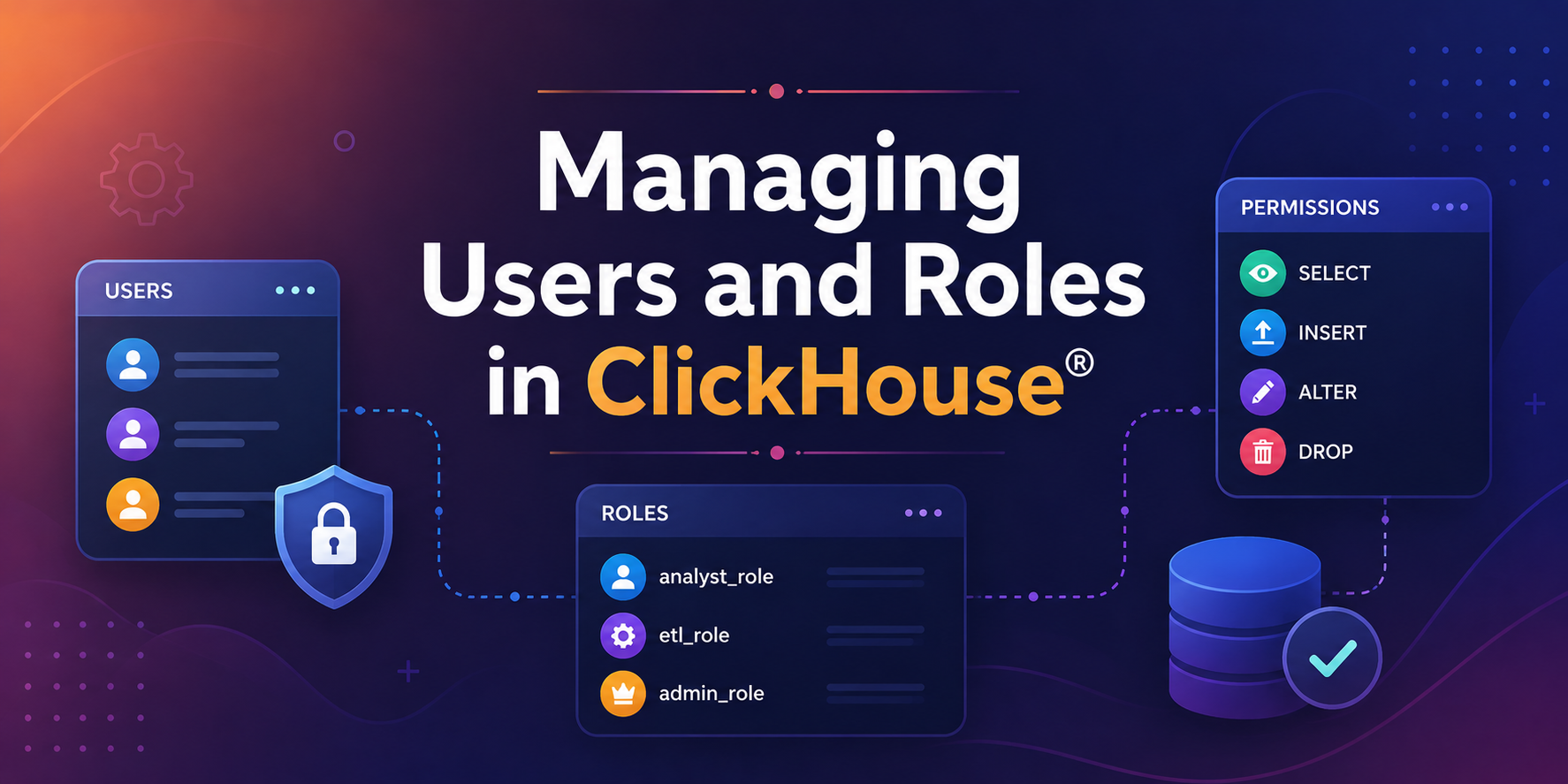
ClickHouse® RBAC (Role-Based Access Control) provides a structured way to manage user access and permissions within ClickHouse® environments. As deployments grow, multiple users often need access to the same databases and tables. While administrators may require full control over the system, analysts might only need permission to view data, and applications may only require access to insert records.
Managing permissions individually for every user quickly becomes difficult and error-prone. To solve this challenge, ClickHouse® provides a Role-Based Access Control (RBAC) system that helps administrators manage access through users, roles, and privileges.
In this guide, we’ll explore how access control works in ClickHouse®, understand the role of RBAC, and learn how to securely manage users and permissions.
Why Access Control Matters
Imagine an analytics environment with the following users:
| User | Responsibility |
|---|---|
| Admin | Manage the entire database |
| Analyst | Query and analyze data |
| ETL Service | Insert data into tables |
| Developer | Create and modify objects |
If every permission is assigned manually, managing access becomes increasingly complex as the number of users grows.
Furthermore, incorrectly assigned permissions can expose sensitive data or allow unintended modifications.
This is where RBAC becomes essential.
Understanding Access Control in ClickHouse®
Before creating users and roles, it’s important to understand how ClickHouse® controls access to resources.
ClickHouse® uses an access control model based on:
- Users
- Roles
- Privileges
- Database Objects
Together, these components determine who can access the system and what actions they can perform.
Understanding Role-Based Access Control (RBAC)
Role-Based Access Control (RBAC) is a security model that assigns permissions to roles rather than directly to individual users.
For example, imagine an organization with ten analysts who only need read access to reporting tables. Instead of granting the same permissions to each analyst separately, an administrator can create a single role containing the required permissions and assign that role to all analysts.
Analyst Role ↓SELECT Permission ↓analytics.salesAny user assigned to the Analyst Role automatically receives the associated permissions.
As a result, access management becomes simpler, more scalable, and easier to maintain.
How Access Control Works in ClickHouse®
ClickHouse® access management consists of four key components:
Users
Users are accounts that authenticate and connect to a ClickHouse® server.
Examples include:
- Administrators
- Analysts
- Developers
- Applications
- ETL services
Roles
Roles are collections of permissions that can be shared among multiple users.
Examples:
- analyst_role
- developer_role
- admin_role
Privileges
Privileges define what actions can be performed.
Examples include:
- SELECT
- INSERT
- ALTER
- CREATE
- DROP
Database Objects
Privileges are granted on database resources such as:
- Databases
- Tables
- Views
The relationship can be represented as:
User ↓Role ↓Privilege ↓Database ObjectUnderstanding Privileges
Privileges define what actions a user or role can perform within ClickHouse®. They are the foundation of access control and determine which operations are allowed on databases, tables, and other objects.
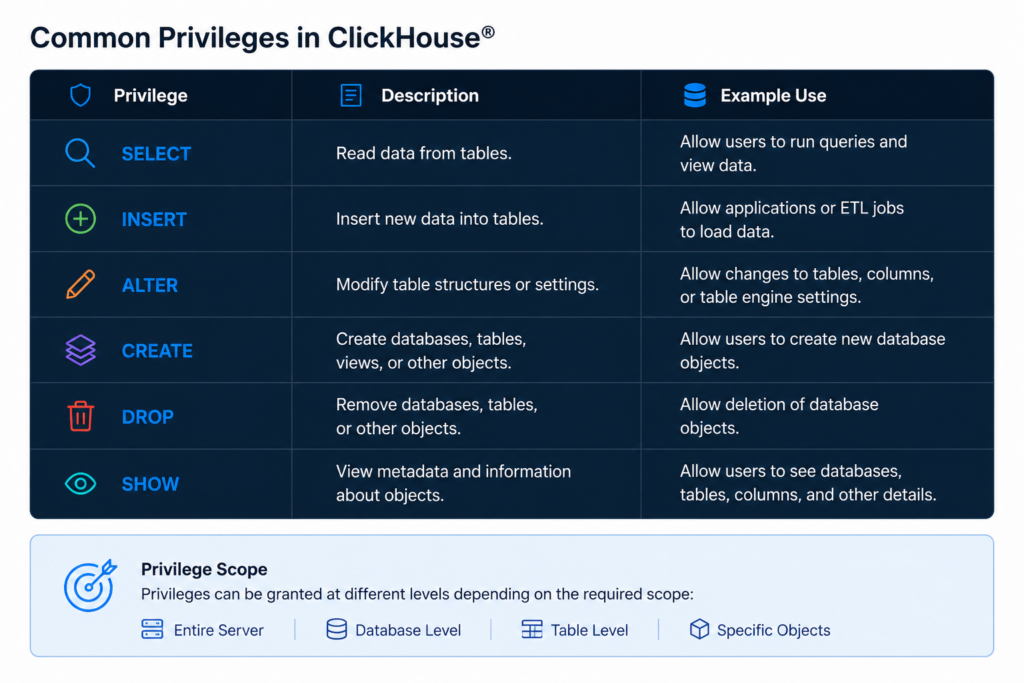
For example, an analyst may only require SELECT privileges on reporting tables, while an administrator may need broader privileges to manage database objects. By assigning privileges through roles, ClickHouse® simplifies permission management and improves security.
Why Use Roles Instead of Direct Permissions?
While ClickHouse® allows permissions to be granted directly to users, managing permissions through roles is generally considered a best practice.
Benefits include:
- Easier administration
- Consistent access policies
- Reduced risk of configuration errors
- Simplified auditing and compliance
As environments grow, roles provide a scalable way to manage permissions across multiple users.
Implementing RBAC in ClickHouse®
Creating a User
Let’s begin by creating a user account.
CREATE USER analystIDENTIFIED BY 'StrongPassword123';To verify that the user was created successfully:
SHOW USERS;At this stage, the user exists but does not have permission to access any data.
This is an important security principle because newly created users start with no privileges by default.
Creating a Role
Rather than granting permissions directly to the user, we’ll first create a role.
CREATE ROLE analyst_role;To view available roles:
SHOW ROLES;Currently, the role exists but has no permissions associated with it.
Granting Permissions to a Role
Next, we’ll grant permissions to the role.
For example, to allow users to read data from the analytics database:
GRANT SELECT ON analytics.* TO analyst_role;Now the role contains a permission, but no user is using it yet.
Assign the Role to the User
Once the role has the necessary permissions, it can be assigned to the user.
GRANT analyst_role TO analyst;The relationship now becomes:
User: analyst ↓Role: analyst_role ↓Privilege: SELECT ↓Database: analyticsAs a result, the analyst user can query data from the analytics database.
Verify Access
After assigning roles and permissions, it’s a good practice to verify the user’s access.
To view permissions granted to a user:
SHOW GRANTS FOR analyst;To inspect permissions assigned to a role:
SHOW GRANTS FOR analyst_role;These commands are useful when auditing access configurations or troubleshooting permission issues.
Manage Multiple Roles
In real-world environments, users often perform multiple responsibilities and may require more than one role.
For example, a developer may need:
- Read access
- Schema modification permissions
Instead of creating a large role with excessive privileges, administrators can create separate roles and assign both to the same user.
CREATE ROLE reporting_role;CREATE ROLE developer_role;Assign them:
GRANT reporting_role TO analyst;GRANT developer_role TO analyst;This approach improves flexibility and follows security best practices.
Revoke Permissions When Needed
As requirements change, permissions can be revoked to maintain security and follow the principle of least privilege.
For example:
REVOKE SELECT ON analytics.* FROM analyst_role;Once revoked, all users assigned to that role immediately lose the permission.
This centralized management is one of the biggest advantages of RBAC.
Common Access Control Scenarios
Read-Only Analyst
Users can view data but cannot modify it.
GRANT SELECT ON analytics.* TO analyst_role;ETL Service Account
Applications that load data typically require insert permissions.
GRANT INSERT ON analytics.* TO etl_role;Database Administrator
Database Administrators often require broader permissions to manage database objects.
GRANT CREATE, INSERT, ALTER, DROP ON analytics.* TO admin_role;Such privileges should be granted carefully and only when necessary, following the principle of least privilege.
Best Practices for Managing Users and Roles
To maintain a secure ClickHouse® environment:
- Follow the principle of least privilege
- Prefer roles over direct user permissions
- Use strong authentication credentials
- Review permissions regularly
- Remove inactive accounts
- Separate application users from administrator accounts
- Audit role assignments periodically
These practices help reduce security risks while simplifying administration.
Exploring ClickHouse® for Your Analytics?
At Quantrail Data, we help teams run ClickHouse® reliably for real-time analytics – from Kubernetes deployments and migrations to performance tuning in production.
We see these challenges firsthand while supporting demanding analytics workloads. In one recent engagement, a customer achieved near bare-metal performance with ClickHouse® in production – a story we’ve shared here:
Success Story: Quantrail Bare-Metal ClickHouse® Deployment
If you’re evaluating ClickHouse® or trying to get more out of an existing setup, we’re happy to share practical lessons from real-world deployments.
Contact
Quantrail Data
Conclusion
Managing users and roles is a fundamental aspect of securing ClickHouse® environments. Through Role-Based Access Control (RBAC), administrators can assign permissions efficiently, reduce management complexity, and enforce consistent security policies.
Whether you’re managing a small analytics deployment or a large production cluster, understanding users, roles, privileges, and grants will help you build a secure and scalable access control strategy for ClickHouse®.
Reference
ClickHouse Documentation – Access Control and Account Management