As datasets grow from gigabytes to terabytes and beyond, a single database server eventually becomes a bottleneck. To support high-volume analytics workloads, ClickHouse® provides a distributed architecture that enables horizontal scaling, fault tolerance, and high availability.
Three fundamental concepts form the foundation of this architecture:
- Nodes
- Shards
- Replicas
Understanding how these components work together is essential for designing and operating production-grade ClickHouse® clusters.
Why Distributed Architecture Matters
A standalone ClickHouse® server can process billions of rows efficiently. However, there are practical limits to the amount of CPU, memory, storage, and network bandwidth available on a single machine.
Distributed architecture addresses these limitations by:
- Scaling storage across multiple servers
- Distributing query execution
- Increasing fault tolerance
- Improving availability during failures
- Supporting larger analytical workloads
Before discussing cluster design, it is important to understand the building blocks.
What Is a Node?
A node is a single ClickHouse® server instance running on a machine or virtual machine.
Each node contains:
- CPU resources
- Memory
- Storage
- ClickHouse® server process
A node can operate independently or participate in a larger cluster.
Single-Node Deployment
+------------------+
| ClickHouse Node  |
|                  |
| Data             |
| Queries          |
| Storage          |
+------------------+
This deployment model is simple and suitable for:
- Development environments
- Testing
- Small-scale analytics workloads
However, all data and query processing remain confined to one machine.
If the server fails, the database becomes unavailable.
What Is a Shard?
A shard is a subset of the total dataset.
Sharding divides data across multiple nodes so that each node stores only a portion of the overall data.
Instead of storing every row on every server, data is distributed among shards.
Example
Assume an events table contains 3 billion records.
Without sharding:
Node 1
-------
All 3 Billion Rows
With three shards:
Shard 1 -> Node 1
Shard 2 -> Node 2
Shard 3 -> Node 3
Each node stores approximately one-third of the data.
Benefits of Sharding
Horizontal Scalability
Storage capacity grows as new shards are added.
More Data
    ↓
Add More Shards
Parallel Query Execution
When a query is executed, ClickHouse® can process data on multiple shards simultaneously.
Query
  ↓
Shard 1
Shard 2
Shard 3
  ↓
Results Combined
This parallelism significantly improves performance for large analytical workloads.
Reduced Resource Pressure
Since each shard stores only part of the dataset, memory and storage requirements are distributed across the cluster.
How Data Is Assigned to Shards
Data distribution is typically based on a sharding key.
Example:
cityHash64(user_id)When new rows are inserted, ClickHouse® calculates the sharding key and determines which shard should store the data.
Example distribution:
| User ID | Shard |
|---|---|
| 101 | Shard 1 |
| 102 | Shard 2 |
| 103 | Shard 3 |
| 104 | Shard 1 |
A good sharding key should distribute data evenly across all shards.
Poor sharding strategies can lead to data skew, where one shard stores significantly more data than others.
What Is a Replica?
A replica is a copy of a shard stored on another node.
Replication provides redundancy and fault tolerance.
Without replication:
Shard 1 -> Node 1If Node 1 fails:
Shard 1 LostWith replication:
Shard 1
   ├── Replica A -> Node 1
   └── Replica B -> Node 2
If Node 1 becomes unavailable, Node 2 still contains the same data.
The cluster remains operational.
Benefits of Replication
High Availability
Queries can continue even when a node fails.
Applications experience minimal disruption.
Fault Tolerance
Hardware failures, disk failures, or server crashes do not result in permanent data loss.
Maintenance Flexibility
Administrators can upgrade or restart servers without taking the entire database offline.
Shards vs Replicas
Many beginners confuse these concepts because both involve multiple servers.
The difference is straightforward.
| Shard | Replica |
|---|---|
| Stores part of the data | Stores a copy of the data |
| Used for scaling | Used for availability |
| Increases storage capacity | Increases fault tolerance |
| Different data on each shard | Same data across replicas |
| Improves parallelism | Improves reliability |
Think of it this way:
- Sharding distributes data.
- Replication duplicates data.
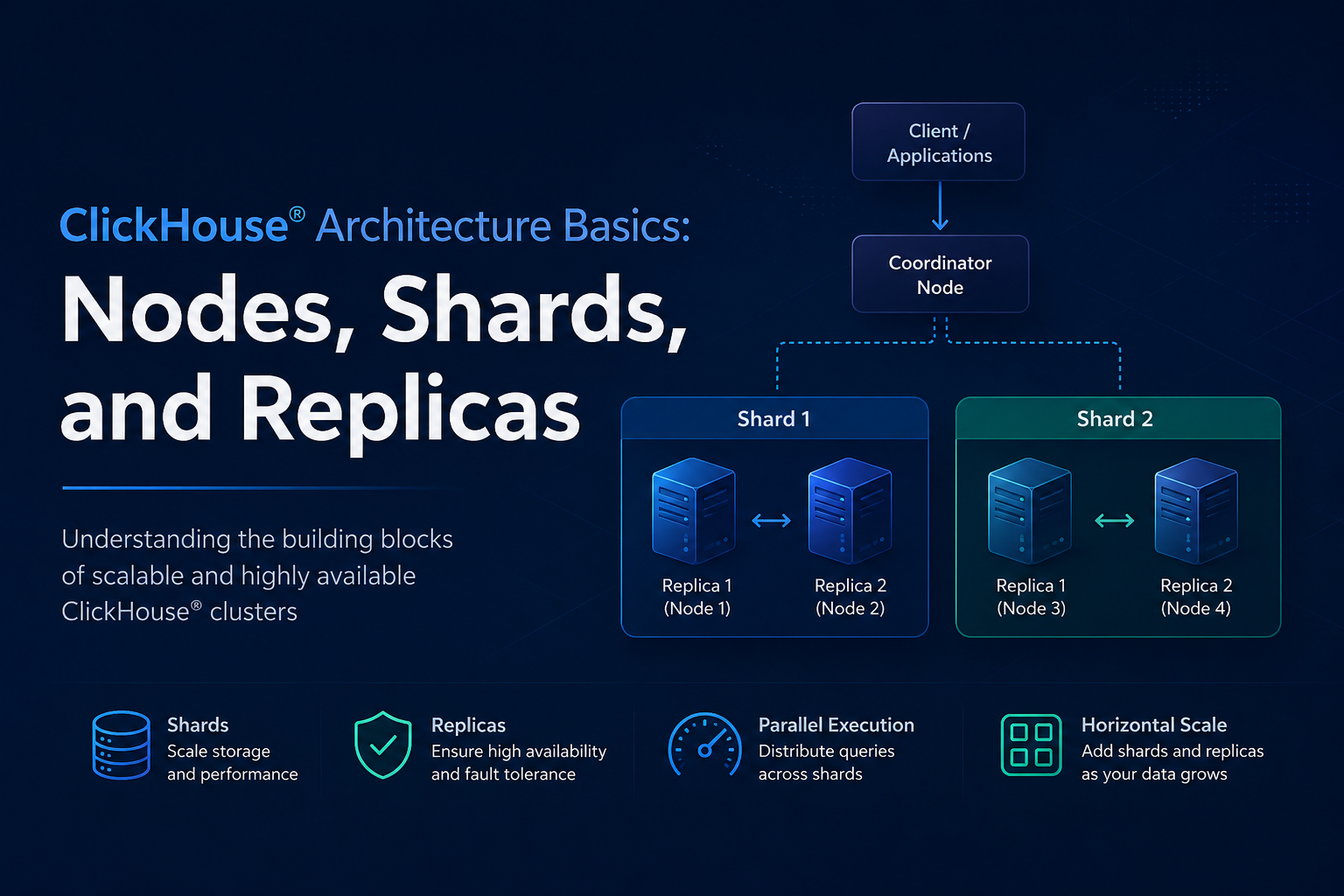
Combining Shards and Replicas
Production deployments typically use both.
Example cluster:
               Cluster
                   |
     --------------------------------
     |                              |
   Shard 1                       Shard 2
     |                              |
  ----------                    ----------
  |        |                    |        |
Node 1   Node 2              Node 3   Node 4
Replica  Replica             Replica  Replica
In this configuration:
- Data is split between Shard 1 and Shard 2.
- Each shard has two replicas.
- Queries can run across both shards.
- The system remains available if a node fails.
This architecture delivers both scalability and resilience.
From Theory to Practice: Creating Shards, Replicas, and Distributed Tables
So far, we have discussed nodes, shards, and replicas conceptually. Let’s see how these concepts are represented inside a real ClickHouse® cluster.
Consider a cluster with four servers:
Shard 1
 ├── Node 1 (Replica 1)
 └── Node 2 (Replica 2)

Shard 2
 ├── Node 3 (Replica 1)
 └── Node 4 (Replica 2)
In this setup:
- We have 4 nodes.
- We have 2 shards.
- Each shard has 2 replicas.
Defining the Cluster
A ClickHouse® cluster is defined in the server configuration.
Example:
<remote_servers>
    <analytics_cluster>
        <shard>
            <replica>
                <host>node1</host>
                <port>9000</port>
            </replica>
            <replica>
                <host>node2</host>
                <port>9000</port>
            </replica>
        </shard>

        <shard>
            <replica>
                <host>node3</host>
                <port>9000</port>
            </replica>
            <replica>
                <host>node4</host>
                <port>9000</port>
            </replica>
        </shard>
    </analytics_cluster>
</remote_servers>
This configuration tells ClickHouse®:
- The cluster name is
analytics_cluster. - There are two shards.
- Each shard contains two replicas.
Notice that nodes are simply ClickHouse® servers. A shard is represented by a <shard> section, and replicas are represented by <replica> entries inside that shard.
Creating a Replicated Table
Replication is typically implemented using the ReplicatedMergeTree engine.
Example:
CREATE TABLE test.events_local
(
    event_id UInt64,
    user_id UInt64,
    event_time DateTime,
    event_type String
)
ENGINE = ReplicatedMergeTree(
    '/clickhouse/tables/{shard}/events_local',
    '{replica}'
)
ORDER BY (event_time, user_id);
Let’s break this down.
ZooKeeper / ClickHouse Keeper Path
/clickhouse/tables/{shard}/events_localStores metadata about replicas.
Example:
/clickhouse/tables/shard1/events_localAll replicas belonging to Shard 1 will synchronize using this path.
Replica Name
{replica}Automatically resolves to values such as:
node1
node2
Each replica registers itself using a unique name.
What Happens During Replication?
Suppose an INSERT arrives at Node 1.
INSERT INTO events_local VALUES (...);The data is:
- Written locally on Node 1.
- Replication metadata is recorded in ClickHouse Keeper.
- Node 2 detects new data.
- Node 2 downloads missing parts.
Result:
Node 1 Data
      ↓
ClickHouse Keeper
      ↓
Node 2 Synchronizes
Both replicas eventually contain identical data.
What Is a Distributed Table?
A common misconception is that data is inserted directly into shards.
In reality, applications often interact with a Distributed table.
A Distributed table contains no actual data.
Instead, it acts as a routing layer across shards.
Creating a Distributed Table
CREATE TABLE events
AS events_local
ENGINE = Distributed(
    'analytics_cluster',
    'default',
    'events_local',
    cityHash64(user_id)
);
Let’s understand each parameter.
Distributed(
    'analytics_cluster',
    'default',
    'events_local',
    cityHash64(user_id)
)| Parameter | Meaning |
|---|---|
| analytics_cluster | Cluster name |
| default | Database name |
| events_local | Local table on each shard |
| cityHash64(user_id) | Sharding key |
How Inserts Work
Application:
INSERT INTO events VALUES (...);The Distributed table calculates:
cityHash64(user_id)Then decides:
User A → Shard 1
User B → Shard 2
User C → Shard 1
User D → Shard 2
The row is automatically forwarded to the correct shard.
The application does not need to know where the data is stored.
How Queries Work
Application:
SELECT count(*)
FROM events;
The Distributed table performs the following steps:
Query Received
      ↓
Forward to Shard 1
Forward to Shard 2
      ↓
Partial Results Returned
      ↓
Final Aggregation
      ↓
Response Sent Back
The user sees a single table while ClickHouse® executes the query across multiple servers.
Local Tables vs Distributed Tables
A production cluster typically contains both.
Local Table
events_local- Stores actual data
- Exists on every node
- Usually uses ReplicatedMergeTree
Distributed Table
events- Stores no data
- Routes inserts
- Aggregates query results
- Provides a single cluster-wide view
Think of it this way:
events_local
    = Physical Storage

events
    = Cluster-Wide Access Layer
This separation is one of the most important concepts in ClickHouse® architecture and is fundamental to how distributed clusters scale efficiently.
Query Flow in a Distributed Cluster
Consider a query:
SELECT count(*)
FROM events;
Execution typically follows these steps:
Step 1: Query Arrival
The query reaches a coordinator node.
Step 2: Query Distribution
The coordinator forwards the query to all relevant shards.
Step 3: Local Processing
Each shard processes its own portion of the data.
Shard 1 -> Partial Count
Shard 2 -> Partial Count
Shard 3 -> Partial Count
Step 4: Result Aggregation
Partial results are returned and combined.
100M + 120M + 80M
=
300M Rows
Step 5: Final Response
The aggregated result is returned to the client.
This distributed execution model is one reason ClickHouse® can process massive datasets with low latency.
Typical Production Topology
A common production deployment might look like:
2 Shards × 2 ReplicasResulting in:
Shard 1
 ├─ Node 1
 └─ Node 2

Shard 2
 ├─ Node 3
 └─ Node 4
Characteristics:
- Data split across two shards
- Redundant copies via replication
- Fault tolerance for node failures
- Parallel query execution
As data volume grows, additional shards can be introduced.
Choosing the Right Number of Shards and Replicas
There is no universal configuration.
The optimal design depends on:
- Data volume
- Query concurrency
- Availability requirements
- Hardware resources
- Budget constraints
General guidelines:
More Shards
Use when:
- Storage capacity is insufficient
- Query workloads require more parallelism
- Data volume is growing rapidly
More Replicas
Use when:
- High availability is critical
- Read traffic is heavy
- Downtime must be minimized
Exploring ClickHouse® for Your Analytics?
At Quantrail Data, we help teams run ClickHouse® reliably for real-time analytics – from Kubernetes deployments and migrations to performance tuning in production.
We see these challenges firsthand while supporting demanding analytics workloads. In one recent engagement, a customer achieved near bare-metal performance with ClickHouse® in production – a story we’ve shared here:
Success Story: Quantrail Bare-Metal ClickHouse® Deployment
If you’re evaluating ClickHouse® or trying to get more out of an existing setup, we’re happy to share practical lessons from real-world deployments.
Contact
Quantrail Data
Conclusion
Nodes, shards, and replicas are the core building blocks of ClickHouse® distributed architecture.
A node is an individual ClickHouse® server.
A shard is a partition of the dataset used to scale storage and query processing.
A replica is a copy of a shard used to provide fault tolerance and high availability.
Together, these components allow ClickHouse® to scale beyond a single machine while maintaining the performance and reliability required for large-scale analytical workloads.
Understanding these concepts is the first step toward designing efficient ClickHouse® clusters and mastering distributed analytics at scale.
References
Official ClickHouse® Documentation – https://clickhouse.com/docs