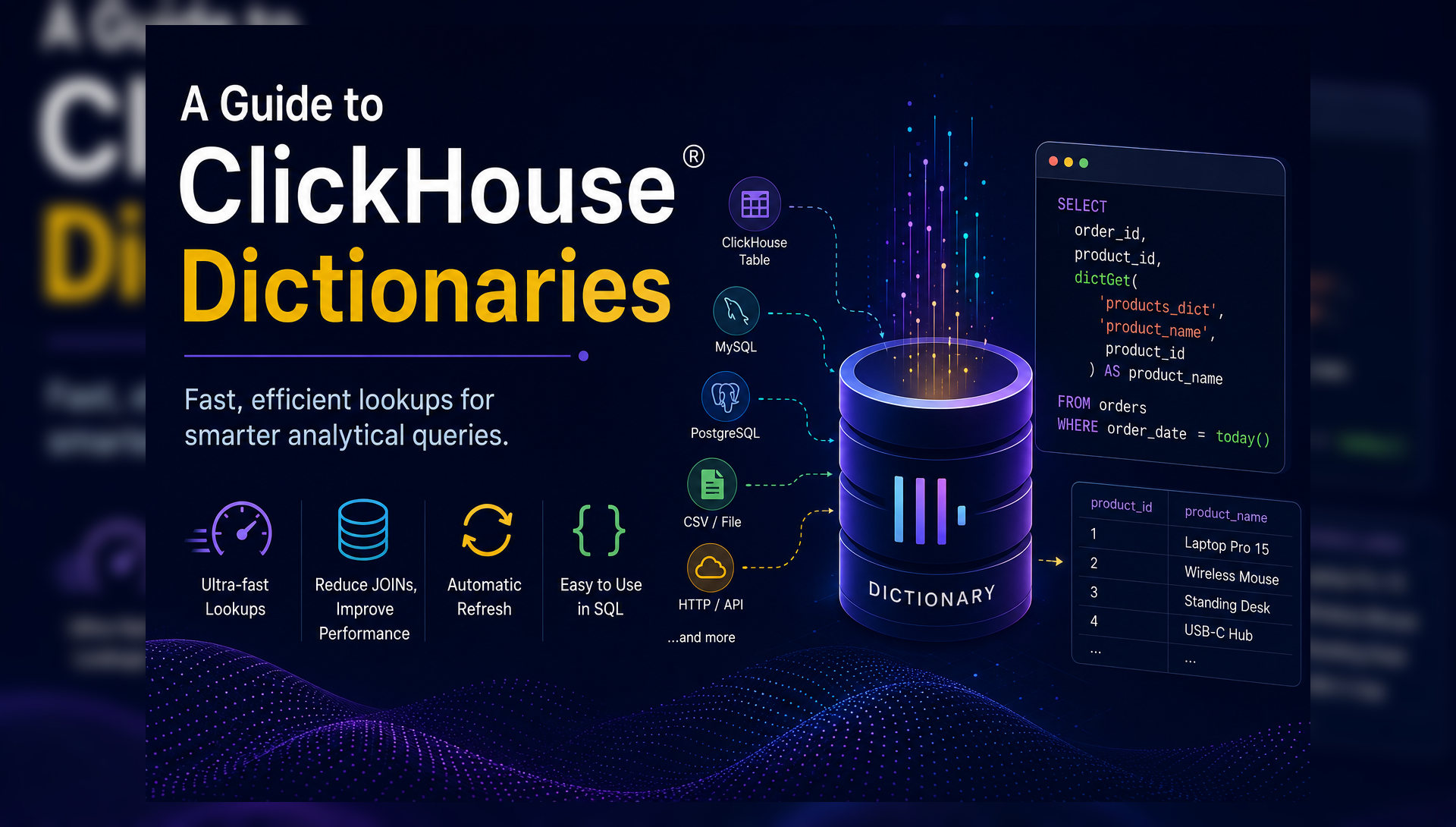
When working with analytical workloads, it is common to enrich fact tables with additional information such as customer names, product details, country mappings, or business metadata. Traditionally, this is achieved using SQL JOINs. However, JOINs can become expensive when executed repeatedly on large datasets.
This is where ClickHouse® Dictionaries come into play.
Dictionaries provide a fast key-value lookup mechanism that allows ClickHouse® to retrieve reference data efficiently without performing costly joins during query execution. Moreover, they are one of the most powerful and underutilized features in ClickHouse®. Understanding them can significantly improve both query performance and data pipeline design.
In this blog, we’ll explore what dictionaries are, how they work, their advantages, and how to create and use them effectively.
What is a Dictionary in ClickHouse®?
A dictionary in ClickHouse® is a special data structure that stores data as key-value pairs in memory (or on disk, depending on the layout). Furthermore, it acts as a lookup table that can be queried using built-in dictionary functions directly inside SQL queries.
Think of it as a fast, always-available reference table that ClickHouse® keeps loaded in memory, so your queries don’t have to fetch and join data from disk every time.
Key characteristics:
- Stored in memory for fast access.
- Loaded from an external or internal source (MySQL, PostgreSQL, CSV, ClickHouse® table, HTTP, etc.)
- Automatically refreshed at configurable intervals.
- Queried using special dictionary functions like dictGet().
- Avoids the cost of runtime JOIN operations on large tables.
Why Use Dictionaries?
Dictionaries are ideal when you have a small, mostly static reference table that needs to be looked up frequently during queries. Instead of running a JOIN every time, the reference data is loaded into memory once and accessed instantly using dictGet().
The key advantage is performance. A JOIN scans and matches rows at query execution time, meaning every query pays the cost. A dictionary lookup, on the other hand, happens in memory in constant time, regardless of how large the main table is. As a result, there is no JOIN, no disk read, and no performance penalty.
How Dictionaries Work
Fact Table
    │
    │ customer_id = 101
    ▼
Dictionary
    │
    ├── 101 → John
    ├── 102 → Alice
    └── 103 → David
    ▼
Lookup Result
    │
    ▼
John
Instead of joining two tables, ClickHouse® directly retrieves the matching value using the key. As a result, query execution becomes significantly faster, especially at scale.
Creating a Dictionary
Dictionaries in ClickHouse® are created using a CREATE DICTIONARY statement. The syntax is straightforward, we define the columns, specify where the data comes from, choose how it is stored in memory, and set how often it should refresh.
Syntax
CREATE DICTIONARY [database.]dictionary_name
(
    key_column     DataType,
    attribute1     DataType,
    attribute2     DataType
)
PRIMARY KEY key_column
SOURCE(source_type(
    -- source connection details
))
LAYOUT(layout_type())
LIFETIME(MIN min_seconds MAX max_seconds);| Clause | Description |
|---|---|
| PRIMARY KEY | The column used as the lookup key. |
| SOURCE | Where the dictionary loads data from. |
| LAYOUT | How the data is stored in memory. |
| LIFETIME | How often the dictionary refreshes |
Practical Example: Product Enrichment
Consider a scenario where you have two tables:
- An orders table – records millions of daily transactions
- A products table – a small reference table with product details
-- Large transactional table

CREATE TABLE default.orders (
    order_id    UInt32,
    product_id  UInt32,
    quantity    UInt16,
    total_price Decimal64(2),
    order_date  Date
) ENGINE = MergeTree()
ORDER BY order_date;

INSERT INTO default.orders VALUES
 (1001, 1, 2, 2400.00, today()),
 (1002, 3, 1, 350.00,  today()),
 (1003, 2, 5, 125.00,  today()),
 (1004, 4, 3, 89.99,   today());
``` - ```
-- Small reference table

CREATE TABLE default.products (
    product_id  UInt32,
    name        String,
    category    String
) ENGINE = MergeTree()
ORDER BY product_id;

INSERT INTO default.products VALUES
    (1, 'Laptop Pro 15', 'Electronics'),
    (2, 'Wireless Mouse', 'Accessories'),
    (3, 'Standing Desk', 'Furniture'),
    (4, 'USB-C Hub', 'Accessories');
To get order details along with product name and category, the traditional approach would be a JOIN:
-- Traditional approach: JOIN every time
SELECT
    o.order_id,
    o.product_id,
    p.name        AS product_name,
    p.category    AS category,
    o.quantity,
    o.total_price
FROM orders o
JOIN products p ON o.product_id = p.product_id
WHERE o.order_date = today();
However, on a table with millions of rows, this approach can be very slow and expensive. Since products is a small, mostly static reference table, it is therefore a perfect candidate for a dictionary. We load it into memory once, and all future lookups happen instantly without any JOIN.
Step 1: Create the dictionary for the Products table
CREATE DICTIONARY products_dict
(
    product_id  UInt32,
    name        String,
    category    String
)
PRIMARY KEY product_id
SOURCE(CLICKHOUSE(
    TABLE 'products'
    DB 'default'
))
LAYOUT(HASHED())
LIFETIME(MIN 600 MAX 700);
ClickHouse® loads the products table into memory as a dictionary and refreshes it automatically every 600–700 seconds.
Step 2: Use the dictionary in a query
Since we already created products_dict from the products table, we can skip the JOIN entirely and use dictGet() instead:
-- With dictionary: no JOIN needed
SELECT
    order_id,
    product_id,
    dictGet('products_dict', 'name', product_id)     AS product_name,
    dictGet('products_dict', 'category', product_id) AS category,
    quantity,
    total_price
FROM orders
WHERE order_date = today();
Output:
| order_id | product_id | product_name | category | quantity | total_price |
|---|---|---|---|---|---|
| 1001 | 1 | Laptop Pro 15 | Electronics | 2 | 2400.00 |
| 1002 | 3 | Standing Desk | Furniture | 1 | 350.00 |
| 1003 | 2 | Wireless Mouse | Accessories | 5 | 125.00 |
The result is identical to the JOIN – however, ClickHouse® fetches the product details directly from memory, with no JOIN, no disk read, and significantly better performance at scale.
ClickHouse® Dictionary Architecture
External Sources
ClickHouse® dictionaries can be loaded from a variety of external sources. Here are the most commonly used ones:
1. From a ClickHouse® Table (Most Common)
The simplest and most common approach is loading dictionary data directly from a table in the same or a remote ClickHouse® instance:
SOURCE(CLICKHOUSE(
    HOST 'localhost'
    PORT 9000
    USER 'default'
    PASSWORD '***'
    TABLE 'products'
    DB 'default'
))
We already used this in the product enrichment example above.
2. From a Remote HTTP/HTTPS Endpoint
Useful for fetching CSV, TSV, or JSON data hosted on a remote web server:
SOURCE(HTTP(
    URL 'https://example.com/data.csv',
    FORMAT 'CSV'
))
3. From a PostgreSQL or MySQL Instance
Loads dictionary data directly from an external relational database:
-- PostgreSQL
SOURCE(POSTGRESQL(
    HOST '192.168.1.50'
    PORT 5432
    USER 'read_only_user'
    PASSWORD 'secure_pass'
    DB 'production_db'
    TABLE 'users'
))
-- MySQL
SOURCE(MYSQL(
HOST '192.168.1.50'
PORT 3306
USER 'read_only_user'
PASSWORD 'secure_pass'
DB 'production_db'
TABLE 'users'
))4. From a Local File on the ClickHouse® Server
Loads plain text files stored inside the server’s pre-configured user_files directory:
SOURCE(FILE(
    PATH 'geo_mapping.tsv'
    FORMAT 'TabSeparated'
))
5. From an S3 Bucket
Loads data directly from a file stored in an Amazon S3 bucket, which is useful for large reference datasets maintained in cloud storage:
SOURCE(S3(
    URL 'https://s3.amazonaws.com/my-bucket/reference-data.csv',
    ACCESS_KEY_ID 'your_access_key'      -- Optional
    SECRET_ACCESS_KEY 'your_secret_key'  -- Optional
    FORMAT 'CSV'
))
Most commonly used sources in production: ClickHouse® table, HTTP endpoint, PostgreSQL/MySQL, and S3. The right choice depends on where your reference data lives and how frequently it changes.
Dictionary Layout Types
The layout is one of the most important decisions when creating a dictionary. Choosing the wrong layout can result in poor performance or excessive memory usage.
1. Hash-Based Layouts (Most Common)
- Hashed – stores the full dictionary in an in-memory hash table. Best for dictionaries with very few attributes.
- Hashed_array – the recommended default for most use cases. Stores attributes in separate arrays for better memory efficiency.
- Sparse_hashed – uses less memory than
hashedby trading some CPU efficiency. Best when the dictionary has only one attribute.
2. Complex Key Layouts
Use these when your keys are String or composite values that cannot be cast to an integer:
- Complex_key_hashed
- Complex_key_hashed_array
- Complex_key_sparse_hashed
3. Caching Layouts
- Cache – loads only frequently accessed keys into a fixed-size in-memory cache. Useful when the full dataset is too large to fit in memory.
- ssd_cache – similar to cache, but stores data on SSD and uses memory only for the index.
4. Direct Lookup
- Direct – stores nothing in memory. Every lookup hits the source directly. Best for rapidly changing or very large datasets.
5. Specialized Layouts
- Flat – fastest possible lookup. Keys must be
UInt64with a bounded size. - Range_hashed – like hashed, but supports lookups by key plus a date/time range.
- Ip_trie – designed for fast IP address lookups using CIDR notation.
- Regexp_tree – matches keys using a regular expression tree.
Dictionary Lifetime
The LIFETIME setting controls how often ClickHouse® refreshes the dictionary from its source.
- Periodic Refresh – forces ClickHouse® to refresh the dictionary at a set interval. Additionally, using MIN and MAX adds random jitter to prevent all dictionaries from refreshing simultaneously.
- Static Data – keeps data static until you manually force a refresh.
-- Refresh every 300 seconds (5 minutes)
LIFETIME(MIN 300 MAX 360)

-- Never refresh (static dictionary)
LIFETIME(0)
Using Dictionaries in Queries
Once a dictionary is created, ClickHouse® provides several built-in functions to query it. Let’s walk through each one using the products_dict dictionary we created earlier.
1. **dictGet()**
The primary function for fetching a single attribute:
dictGet('dictionary_name', 'attribute_name', key)We already saw this in action in the product enrichment example above, where dictGet() was used to fetch name and category from products_dict without a JOIN. The same syntax applies to any dictionary you create.
Note: ClickHouse® also supports typed variants of dictGet() when you need to explicitly control the return type such as dictGetString(), dictGetFloat32(), dictGetFloat64(), dictGetInt32(), dictGetDate(), and dictGetDateTime(). In modern ClickHouse® versions, the generic dictGet() is recommended as it automatically infers the return type from the dictionary schema.
**2.dictGetOrDefault()**
Returns a fallback value if the key is not found in the dictionary:
dictGetOrDefault('products_dict', 'name', product_id, 'Unknown Product') AS product_nameOutput:
| order_id | product_id | product_name |
|---|---|---|
| 1001 | 1 | Laptop Pro 15 |
| 1006 | 99 | Unknown Product |
| 1007 | 88 | Unknown Product |
In this case, product_id 99 and 88 do not exist in the dictionary. Therefore, the fallback value Unknown_product is returned instead of an error.
3. **dictGetOrNull()**
Returns NULL if the key is not found:
dictGetOrNull('products_dict', 'name', product_id) AS product_nameOutput:
| order_id | product_id | product_name |
|---|---|---|
| 1001 | 1 | Laptop Pro 15 |
| 1006 | 99 | NULL |
| 1007 | 88 | NULL |
This is useful when you want to handle missing keys explicitly using isNull() or coalesce() in your query logic.
4. **dictHas()**
Checks whether a key exists in the dictionary. Returns 1 if found, 0 if not:
dictHas('products_dict', product_id) AS is_known_productOutput:
| order_id | product_id | is_known_product |
|---|---|---|
| 1001 | 1 | 1 |
| 1006 | 99 | 0 |
| 1008 | 2 | 1 |
This is particularly helpful for data quality checks, as it quickly identifies orders with unrecognized product IDs.
5. Handling Date Ranges
To look up values that change over time, such as a historical product price, pass the date as an additional argument to dictGet():
SELECT dictGetAll('prices_dict', 'price', product_id, toDate('2025-01-01')) AS historical_price;Output:
| product_id | historical_price |
|---|---|
| 1 | 1200.00 |
| 2 | 25.00 |
| 3 | 350.00 |
The dictionary automatically returns the exact price that was valid on 2025-01-01 for each product, based on the date ranges defined in the dictionary.
Managing Dictionaries
- View all dictionaries:
SELECT name, status, element_count, bytes_allocated
FROM system.dictionaries;- Reload a dictionary manually:
SYSTEM RELOAD DICTIONARY products_dict;- Drop a dictionary:
DROP DICTIONARY products_dict;- Check dictionary status:
SELECT name, status, last_successful_update_time, loading_duration
FROM system.dictionaries
WHERE name = 'products_dict';
Best Practices
- Choose the right layout – use FLAT for small integer-keyed dictionaries, HASHED for larger ones, and Complex_Key_Hashed for string or composite keys.
- Set appropriate LIFETIME – avoid refreshing too frequently if the source data changes slowly. Additionally, use MIN/MAX to spread the refresh load.
- Monitor memory usage – large dictionaries consume significant RAM. Therefore, always check bytes_allocated in system.dictionaries.
- Use dictGet()OrDefault() – always handle missing keys gracefully to avoid unexpected NULLs in your results.
- Keep dictionaries focused – load only the columns you actually need, rather than the entire source table.
- Use read-only source users – when loading from MySQL or PostgreSQL, always use a dedicated read-only user for security.
When Not to Use Dictionaries
Dictionaries are not always the right tool. Specifically, avoid them when:
- Reference data changes very frequently.
- The lookup dataset is extremely large and memory is limited.
- You need complex relational joins involving multiple tables.
- Strong transactional consistency is required.
In such cases, traditional JOINs or other approaches may be a better fit.
Final Thoughts
ClickHouse® Dictionaries are one of the most effective tools for improving query performance in analytical pipelines. By keeping reference data in memory and making it available through simple lookup functions, they eliminate expensive JOIN operations and reduce query complexity significantly.
Furthermore, whether you’re enriching event streams with product metadata, mapping IP addresses to locations, or looking up user segments in real time, dictionaries provide a clean, fast, and scalable solution.
If you are not yet using dictionaries in your ClickHouse® setup, they are well worth exploring. A small investment in setting them up can, therefore, deliver significant gains in query speed and pipeline simplicity.
Exploring ClickHouse® for Your Analytics?
At Quantrail Data, we help teams run ClickHouse® reliably for real-time analytics, from Kubernetes deployments and migrations to performance tuning in production.
We see these challenges firsthand while supporting demanding analytics workloads. In one recent engagement, a customer achieved near bare-metal performance with ClickHouse® in production, a story we’ve shared here:
Success Story: Quantrail Bare-Metal ClickHouse® Deployment
If you’re evaluating ClickHouse® or trying to get more out of an existing setup, we’re happy to share practical lessons from real-world deployments.
Contact
Quantrail Data