Introduction
One of the reasons ClickHouse® can efficiently handle terabytes and petabytes of analytical data is its storage architecture. Beyond its column-oriented design, ClickHouse® provides a flexible compression framework that allows engineers to optimize storage, reduce I/O, and improve cache efficiency through compression codecs.
When applied correctly, codecs can significantly reduce storage requirements and improve overall system efficiency. However, compression is not a one-size-fits-all optimization. The effectiveness of a codec depends heavily on the characteristics of the underlying data. A codec that performs exceptionally well for time-series metrics may provide little benefit-or even introduce unnecessary CPU overhead-for random or highly variable data.
This article explains how compression works in ClickHouse, the available codec options, and practical guidelines for selecting codecs based on real-world data patterns.
How ClickHouse Stores Data
Unlike traditional row-oriented databases, ClickHouse stores data by column.
Consider the following dataset:
| user_id | country | event_type | revenue |
|---|---|---|---|
| 1 | US | click | 10 |
| 2 | US | view | 0 |
| 3 | US | click | 20 |
Instead of storing complete rows together, ClickHouse stores each column independently:
user_id    -> [1,2,3]
country    -> [US,US,US]
event_type -> [click,view,click]
revenue    -> [10,0,20]
This storage model naturally improves compression because similar values are physically grouped together.
For example:
US
US
US
US
US
compresses far more efficiently than mixed row data:
US
click
10
UK
view
5
Because analytical workloads often scan only a subset of columns, this design also reduces disk I/O and improves query performance.
Compression Pipeline in ClickHouse
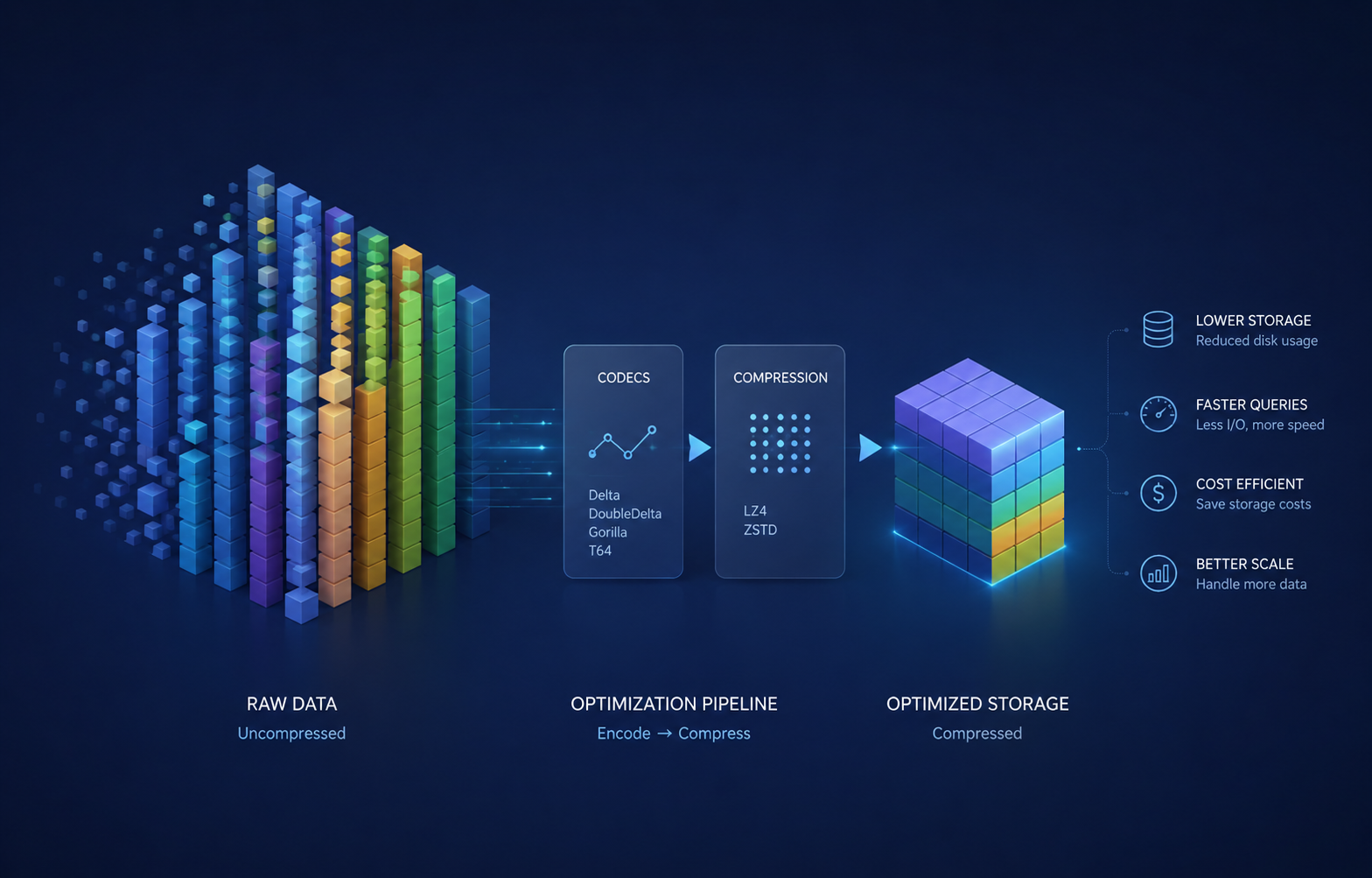
Compression typically occurs in two stages:
- Encoding Codec
- Compression Algorithm
The process can be visualized as:
Original Data
      │
      ▼
Encoding Codec
      │
      ▼
Transformed Data
      │
      ▼
Compression Algorithm
      │
      ▼
Stored Data
Encoding codecs transform values into a representation that is easier for compression algorithms to compress efficiently.
For example, a monotonically increasing sequence:
1000
1001
1002
1003
1004
can be transformed into:
1000
1
1
1
1
which is substantially more compressible.
Default Compression Behavior
If no codec is explicitly specified, ClickHouse uses the compression configuration defined for the server and storage engine.
Historically, LZ4 has been the default compression algorithm in many ClickHouse deployments because of its excellent speed characteristics. However, many modern production environments increasingly favor ZSTD due to its superior compression ratio.
For most workloads, the default configuration provides a reasonable starting point. Codec optimization should generally be considered after observing storage patterns in production.
Example:
In this case ClickHouse® automatically applies its default compression strategy.
CREATE TABLE events
(
    user_id UInt64,
    event_time DateTime,
    event_type String
)
ENGINE = MergeTree
ORDER BY event_time;
Understanding Compression Codecs
Compression codecs are most effective when they match the distribution and ordering of the data.
Different codecs target different patterns:
- Sequential integers
- Regularly spaced timestamps
- Slowly changing metrics
- Floating-point time-series values
- Narrow-range integers
There is no universally optimal codec. The best choice depends on the actual characteristics of the column being compressed.
Delta Codec
Delta encoding stores the difference between consecutive values rather than storing each value directly.
Original values:
100
105
110
115
120
Delta encoded:
100
5
5
5
5
Because the resulting values become highly repetitive, subsequent compression algorithms can achieve significantly better compression ratios.
Example:
CREATE TABLE page_views
(
    id UInt64 CODEC(Delta, ZSTD),
    timestamp DateTime
)
ENGINE = MergeTree
ORDER BY id;
Best suited for:
- Auto-incrementing identifiers
- Event sequence numbers
- Monotonically increasing values
- Some timestamp columns
Typically not useful for:
- UUIDs
- Hash values
- Random identifiers
DoubleDelta Codec
DoubleDelta stores the difference between consecutive deltas.
Consider a sequence with a constant interval:
100
110
120
130
140
Delta encoding produces:
100
10
10
10
10
DoubleDelta encoding produces:
100
10
0
0
0
This can improve compression for highly predictable sequences.
Example:
CREATE TABLE metrics
(
    timestamp UInt64 CODEC(DoubleDelta, ZSTD),
    value Float64
)
ENGINE = MergeTree
ORDER BY timestamp;
Best suited for:
- Regularly spaced timestamps
- Sensor readings
- Structured time-series data
For irregular event streams, DoubleDelta may provide little advantage over standard Delta encoding.
Gorilla Codec
Gorilla encoding was originally developed for time-series workloads and is optimized for floating-point values that change gradually over time.
Example:
CREATE TABLE cpu_metrics
(
    timestamp DateTime,
    cpu_usage Float64 CODEC(Gorilla, ZSTD)
)
ENGINE = MergeTree
ORDER BY timestamp;
Common use cases:
- CPU utilization metrics
- Memory consumption metrics
- Temperature readings
- IoT telemetry
- Monitoring systems
Benefits:
- Excellent compression for correlated floating-point values
- Preserves exact values
- Designed specifically for time-series workloads
The effectiveness of Gorilla depends on adjacent values exhibiting predictable changes. Highly random floating-point values may not benefit significantly.
T64 Codec
T64 is designed for integer columns whose values occupy a relatively narrow range.
Example:
1000
1001
1002
1003
1004
Internally, T64 reorganizes groups of integer values and removes unnecessary high-order bits, reducing the amount of data that must be stored.
Example:
CREATE TABLE user_metrics
(
    score UInt32 CODEC(T64, ZSTD)
)
ENGINE = MergeTree
ORDER BY score;
Best suited for:
- Counters
- Status codes
- Small-range integer values
- Metrics with limited variation
As always, effectiveness should be validated against actual data.
ZSTD Compression
ZSTD is widely recommended for modern ClickHouse deployments because it provides an excellent balance between compression ratio and CPU usage.
Examples:
CODEC(ZSTD)or
CODEC(Delta, ZSTD)Advantages:
- Better compression than LZ4
- Configurable compression levels
- Good balance between storage efficiency and performance
Examples:
ZSTD(1)
ZSTD(3)
ZSTD(6)
ZSTD(9)
Higher levels generally:
- Increase CPU usage
- Increase compression time
- Improve compression ratio
For many workloads, levels between 1 and 3 provide the most practical trade-off.
Example:
revenue Float64 CODEC(ZSTD(3))Combining Codecs
Encoding codecs and compression algorithms can be chained together.
Example:
CODEC(Delta, ZSTD)Compression flow:
Raw Data
   │
   ▼
Delta Encoding
   │
   ▼
ZSTD Compression
Example schema:
CREATE TABLE events
(
    event_id UInt64 CODEC(Delta, ZSTD),
    event_time DateTime CODEC(DoubleDelta, ZSTD),
    revenue Float64 CODEC(Gorilla, ZSTD)
)
ENGINE = MergeTree
ORDER BY event_id;
Chained codecs often outperform either component used independently.
Compression Depends on Data Ordering
One frequently overlooked factor is table ordering.
Compression efficiency is heavily influenced by the ORDER BY clause because adjacent values become physically colocated on disk.
For example:
ORDER BY (country, event_time)may compress significantly better than:
ORDER BY event_timeif queries frequently group data by country.
Before tuning codecs, ensure the sorting key aligns with access patterns and data distribution.
LowCardinality Often Delivers Larger Gains
For string columns with relatively few distinct values, LowCardinality frequently provides larger storage savings than codec experimentation.
Example:
country LowCardinality(String)This approach stores values through dictionary encoding and can dramatically reduce storage requirements for dimensions such as:
- Country codes
- Event types
- Device categories
- Status values
Always evaluate LowCardinality before spending significant effort on string compression tuning.
Measuring Compression Efficiency
Compression decisions should be based on measured results rather than assumptions.
ClickHouse exposes compression statistics through system tables.
Example:
SELECT
    column,
    formatReadableSize(sum(data_uncompressed_bytes)) AS uncompressed,
    formatReadableSize(sum(data_compressed_bytes)) AS compressed,
    round(
        sum(data_uncompressed_bytes) /
        sum(data_compressed_bytes),
        2
    ) AS compression_ratio
FROM system.parts_columns
WHERE table = 'events'
GROUP BY column
ORDER BY compression_ratio DESC;
This allows engineers to identify:
- Highly compressible columns
- Ineffective codec selections
- Opportunities for storage optimization
Practical Starting Points
While every workload is different, the following combinations are commonly effective:
Sequential Integer IDs
CODEC(Delta, ZSTD)Useful when values increase predictably.
Regularly Spaced Timestamps
CODEC(DoubleDelta, ZSTD)Particularly effective when intervals are consistent.
Floating-Point Time-Series Metrics
CODEC(Gorilla, ZSTD)Often effective for monitoring and telemetry workloads.
Low-Cardinality Strings
LowCardinality(String)Evaluate dictionary encoding before experimenting with codecs.
Random Values
Examples:
- UUIDs
- Hashes
- Cryptographic identifiers
A simple approach is often best:
CODEC(ZSTD)Delta-based encodings typically provide little benefit for highly random data.
Common Mistakes
Applying Delta to Random Data
Bad:
uuid UUID CODEC(Delta, ZSTD)Random values generally do not produce meaningful deltas.
Using High ZSTD Levels Everywhere
Bad:
CODEC(ZSTD(9))Higher levels often increase CPU costs significantly while delivering diminishing returns.
Ignoring Data Distribution
The same codec can perform exceptionally well on one dataset and poorly on another.
Always validate assumptions using representative production data.
Benchmark Before Deployment
Codec selection should be treated as an engineering decision rather than a theoretical optimization exercise.
A practical evaluation process:
-
Create a representative dataset.
-
Test multiple codec combinations.
-
Load identical data.
-
Measure:
- Storage consumption
- Insert throughput
- Query latency
- CPU utilization
-
Select the configuration that provides the best overall trade-off.
The smallest storage footprint is not always the optimal outcome.
Exploring ClickHouse® for Your Analytics?
At Quantrail Data, we help teams run ClickHouse® reliably for real-time analytics – from Kubernetes deployments and migrations to performance tuning in production.
We see these challenges firsthand while supporting demanding analytics workloads. In one recent engagement, a customer achieved near bare-metal performance with ClickHouse® in production – a story we’ve shared here:
Success Story: Quantrail Bare-Metal ClickHouse® Deployment
If you’re evaluating ClickHouse® or trying to get more out of an existing setup, we’re happy to share practical lessons from real-world deployments.
Contact
Conclusion
Compression in ClickHouse is about more than reducing disk usage. Effective codec selection can lower I/O costs, improve cache utilization, reduce storage requirements, and contribute to faster analytical workloads.
For many datasets, common starting points include:
Delta + ZSTDfor sequential integers,
DoubleDelta + ZSTDfor regularly spaced timestamps,
and
Gorilla + ZSTDfor floating-point time-series metrics.
However, these should be treated as starting points rather than universal rules. The most effective codec strategy is always determined by actual data characteristics, table ordering, workload requirements, and measured performance in production-like environments.